Built from everyday needs

Apps & Automations

Small, focused tools that turn repetitive tasks into clear, reviewable workflows—helping me spend less time managing details and more time on the work that matters.

iPhone apps with a practical purpose

Each app brings the information and controls needed for one job into a simple screen, without hiding the final decision from the user.

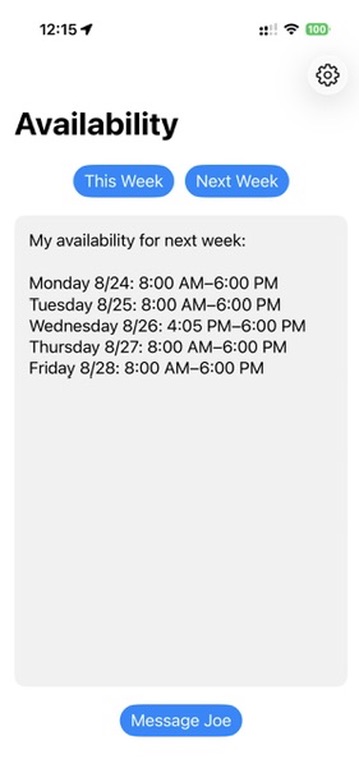
Availability app showing a reviewable list of open times for next week
iPhone App

Availability

Turns a busy calendar into a clean list of times I can actually offer someone.

  • Checks selected calendars for this week or next week.
  • Accounts for travel time around existing appointments.
  • Rounds the result into clean, useful times and leaves out insignificant free windows.
  • Prepares a Messages draft so the availability can be reviewed before it is sent.
Availability prepares the message for review. Sending can stay manual or be automated if desired.
Learn more →
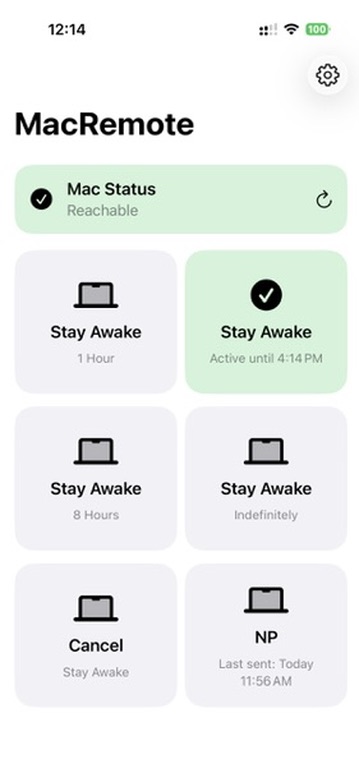
MacRemote app showing a reachable Mac, active Stay Awake status, and the last successful Weekly Visit Notes send
MacRemote icon showing an iPhone connecting to a Mac with a green check
iPhone App

MacRemote

A compact iPhone control panel for checking and running a few important workflows on my Mac. I’m adding more all the time—send suggestions.

  • Shows whether the Mac is currently reachable.
  • Starts Stay Awake for one, four, or eight hours—or indefinitely—and can cancel it at any time.
  • Reports the Mac’s verified live Stay Awake state and expiration, rather than only showing which button was tapped.
  • Runs the Weekly Visit Notes automation and displays the last successful send.
The public view focuses on the workflow and live status; private connection details are intentionally not shown.
Learn more →

Shortcuts for work on the move

These Apple Shortcuts combine calendar, location, travel, navigation, and messaging steps that would otherwise need to be repeated by hand.

Next Visit icon showing a blue navigation arrow and green Messages bubble

Next Visit

Identifies the current or next patient visit from the Work calendar, uses the visit location and current travel information, launches navigation, and handles the appropriate patient ETA message as part of the existing workflow.

Practical workflow: choose the relevant visit, confirm the travel context, begin navigation, and use the prepared communication without re-entering appointment details.
Patient Schedule icon showing a calendar and green Messages bubble

Patient Schedule

Builds a patient’s upcoming appointment schedule from the Work calendar, including recurring appointments, and prepares it as a clear message. When appropriate, the workflow can also include an optional question about whether medication has been received.

Practical workflow: identify the patient, gather upcoming visits, review the schedule and optional question, then continue with the prepared message.
Patient information is intentionally excluded from this public overview and from all public visuals.
Current · Working inside ASM Instructor

Communication Center

Communication Center brings announcements, contacts, email campaigns, and public class publishing into one organized workflow. It helps prepare and review communication, select the intended audience, keep sending history together, and explicitly publish or remove public class information.

Its current workflow and visual organization are the preferred baseline for the future standalone Campaign Manager.

Future · In development · Not released

Campaign Manager

Campaign Manager is being developed as a separate, reusable communication workspace. It is not presented here as a released product. The goal is to carry forward the strongest Communication Center ideas while keeping the new tool independent and suitable for more than one kind of project.